

Contact InvoiceStamp support
Last updated · InvoiceStamp 1.1.0 for iPhone and Android
Email the InvoiceStamp team at [email protected], or use the contact form on invoicestamp.com. Tell us your phone model, its iOS or Android version, the app version from the bottom of Settings, and what you were doing, with a screenshot if you can.
What should I include?
The more of these you send, the faster we can help:
| Include | Where to find it |
|---|---|
| Your phone model and its iOS or Android version | On iPhone, Settings → General → About. On Android, Settings → About phone |
| The InvoiceStamp version | The last line of Profile → Settings, such as InvoiceStamp v1.1.0 |
| The email address of your InvoiceStamp account | Profile, under your name |
| The document number, if it's about a document | The top of the document, such as INV-0001 |
| What you did, what you expected, and what happened | In your own words |
| The exact message on screen | A screenshot is best |
For a question about billing, tell us whether you're on the monthly or yearly plan. Refunds are handled by the App Store or Google Play, wherever you subscribed: see Your subscription.
Can I send a ticket from the app?
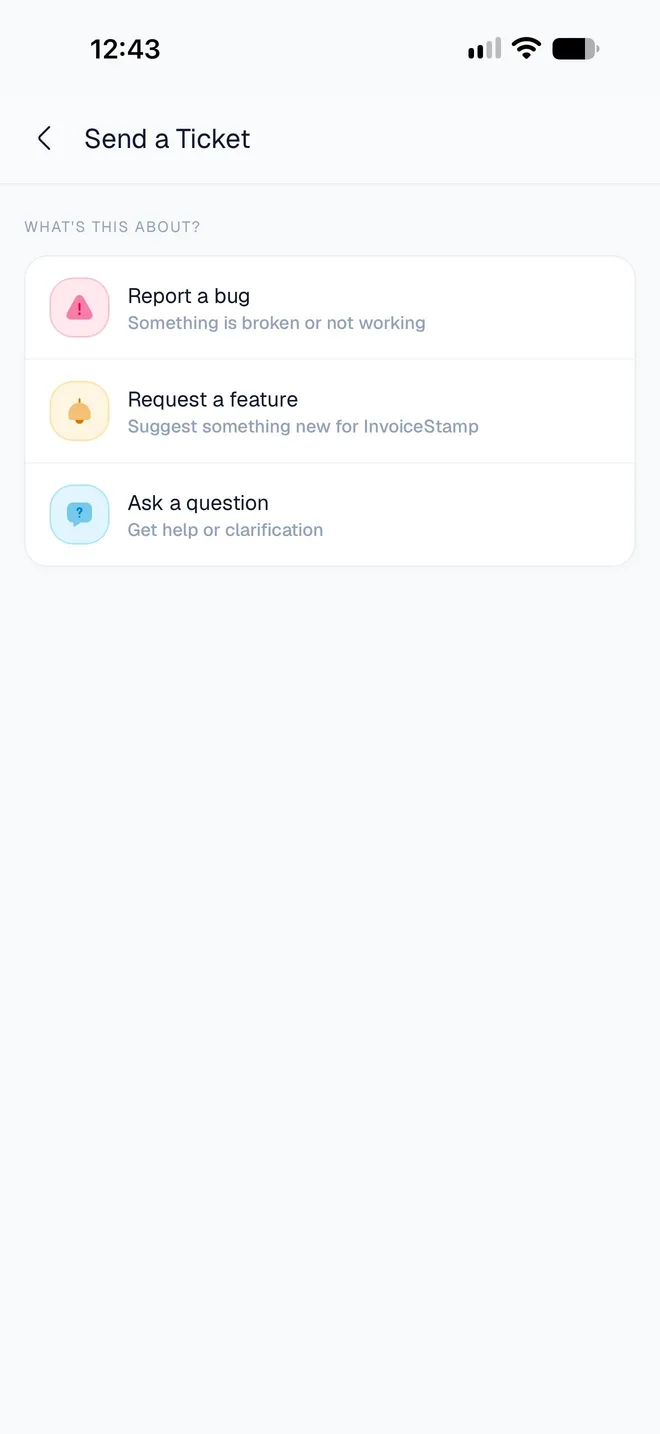
Not yet. Settings → Send a Ticket lets you choose Report a bug, Request a feature or Ask a question, but in version 1.1.0 sending only shows "Support tickets are coming soon." and your message isn't sent. Email us instead, at [email protected].
Is there an answer here already?
Check Troubleshooting: it explains the messages the app shows when something goes wrong, and what to do about each.
Was this page helpful?
Change InvoiceStamp's settings
Switch InvoiceStamp to dark mode, choose where downloaded PDFs are saved, find the terms and app version, and see what signing out clears from your phone.
Delete your InvoiceStamp account
How to permanently delete your InvoiceStamp account from the app, what is erased and what is kept, and why you should cancel your subscription first.