

Read your totals on the Home screen
Last updated · InvoiceStamp 1.1.0 for iPhone and Android
The card at the top of Home adds up the documents you've saved. By default it shows the total of this month's invoices. Tap the first pill to choose which documents it counts, and the second to choose the period. It shows what you billed, in each currency, not what your clients have paid so far.
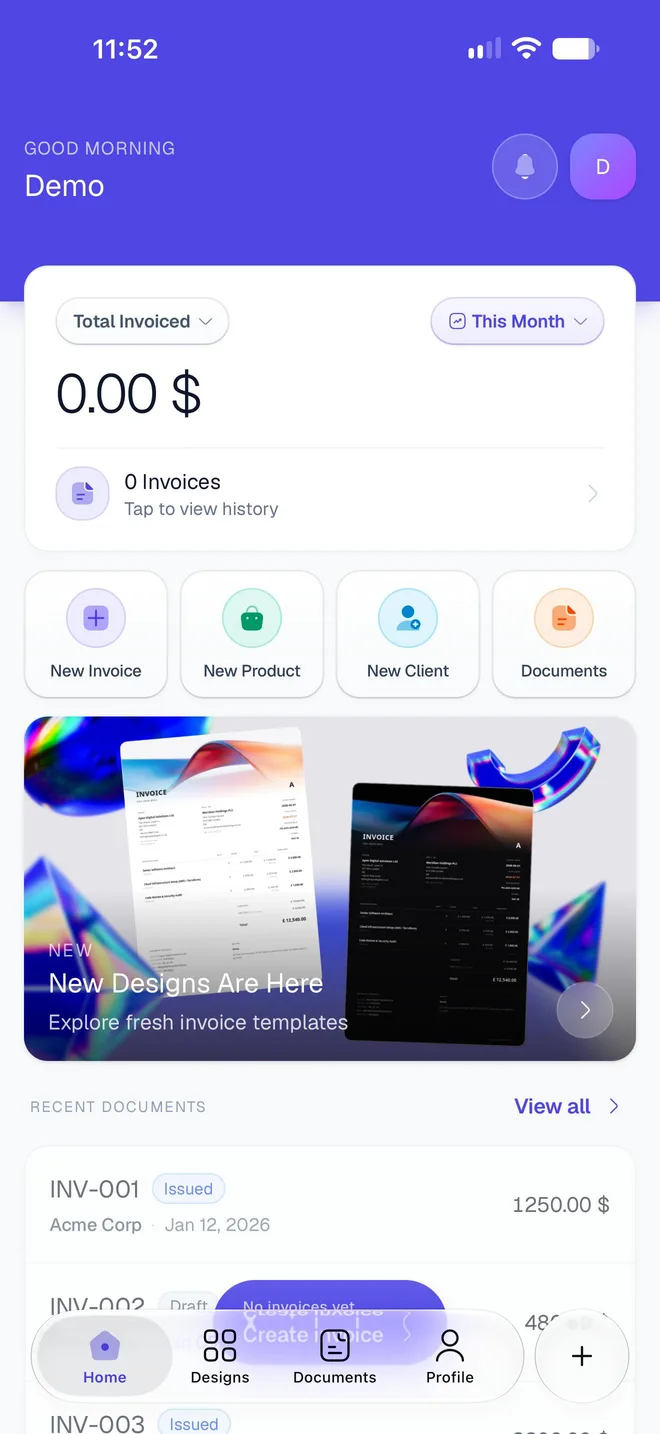
What's at the top of Home?
- The greeting: good morning, afternoon or evening, with your name.
- The bell opens your Notifications. A red badge counts the ones you haven't read. See Notifications and emails.
- Your picture or initials: it's not a button. Your account and settings are in the Profile tab.
How do I change what the card adds up?
Tap the first pill (Total Invoiced at first) and choose the documents to count.
Tap the second pill (This Month at first) and choose the period.
| In the list | It counts | The card reads |
|---|---|---|
| All Documents | Invoices, quotes & orders | Total Amount |
| Quotations | Your quotations | Total Quoted |
| Sale Orders | Your sale orders | Total Sale Orders |
| Invoices | Your invoices | Total Invoiced |
| Period | From |
|---|---|
| This Week | Monday of this week |
| This Month | The 1st of this month |
| This Quarter | The 1st of January, April, July or October |
| This Year | January 1st |
| All Time | Your first document |
Your choice stays as you left it the next time you open Home on this phone.
How are the totals worked out?
- By . A document counts when its issue date falls in the period. A period has a start but no end, so a document dated in the future, even next month, already counts in This Month.
- Whatever the payment. Every saved document of the chosen type counts, paid or not. Total Invoiced is what you billed, not what you received. To see what's still owed, open Documents → Invoice → Unpaid (see Record a payment).
- One total per currency. Amounts in different currencies are never converted or added together. The big number is in your main currency; totals in other currencies are listed under it.
- The count under the total, such as 3 Invoices, includes documents in every currency.
The card updates each time you open Home or come back to the app.
Where does "Tap to view history" go?
The lower part of the card opens the Documents tab, listing every document you've saved. See Find and manage your documents.
What do the four buttons under the card do?
| Button | Opens |
|---|---|
| New Invoice | A blank invoice in the editor |
| New Product | Your products and services, with a new product form open |
| New Client | Your clients, with a new client form open |
| Documents | The list of every document you've saved |
If the editor holds a document with changes you haven't saved, New Invoice asks first: Clear and start new discards them, Keep editing takes you back to them.
Under the buttons, a banner shows what's new in InvoiceStamp, such as new designs. Tap it to see more.
What's in Recent Documents?
The five most recent documents, by their date. Tap one to open its sheet in Documents, where you can record a payment, edit, share or download it. Swipe one left to Pay or Share it straight away. View all opens the full list.
The documents you see before your first save are examples
Until you save a document, Recent Documents shows three faded sample rows (INV-001 for Acme Corp, INV-002 for Globex Inc, INV-003 for Initech) behind a Create invoice button. They aren't your data and can't be opened. They disappear once you save your first document.
Related guides
Was this page helpful?
Record a full or partial payment
Mark an InvoiceStamp invoice as paid, in full or in part, note how you were paid and undo a payment. How Unpaid, Partial, Paid and Overdue are worked out.
Clients and products
Save the clients you bill and the products and services you sell in InvoiceStamp, then add them to any invoice, quotation or sale order in a single tap.